
When Thrustmaster announced their new Sol-R modular joystick system, I knew I had to get my hands on it.
The company kindly sent me the Sol-R 2 setup so I could test it thoroughly — unboxing, setup, in-game performance, and even calibration quirks. After spending hours flying through X4 Foundations, here’s my full, hands-on review.
And if you want to watch this review as a video, here you go:
🧰 Unboxing the Thrustmaster Sol-R System
The first surprise comes right out of the box — it’s thin. You wouldn’t expect a joystick to fit in such a flat package, but that’s because the Sol-R system is fully modular.
The grips and bases come separately, and you assemble them yourself.
Inside the box, Thrustmaster includes detailed instructions showing how to mount, configure, and swap parts. You can use different grips — the Sol-R Grip, Viper HOTAS Grip, or F/A-18 Hornet Grip — and even mount them on different bases like the AVA system. This is where the “modular” concept really shines.
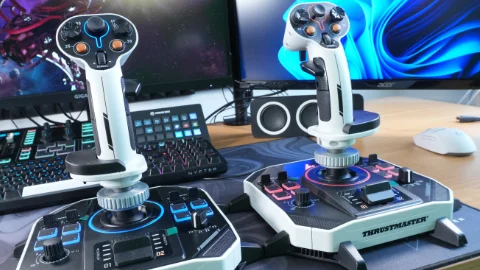
🎮 First Impressions: Build & Feel
The Sol-R Grip feels exactly how a high-end entry-level joystick should.
Most of it is plastic, but the metal mounting collar adds nice weight and stability. It’s not heavy, but it feels solid enough for daily use.
It’s designed for medium to large hands, but there’s also a hand rest attachment for smaller hands — a smart touch.
Button placement is intuitive, with:
● A two-stage trigger,
● A scroll wheel (clickable),
● An analog hat (one of the best I’ve used),
● And multiple digital hats and buttons that all feel tactile and clicky.
What’s even better — you can swap the side-mounted buttons between left and right configurations. That’s a big win for left-handed pilots.
⚙️ The Base: Big, Clicky, and Feature-Packed
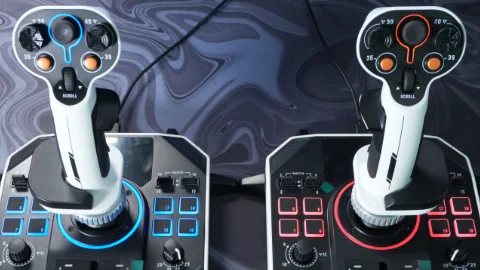
The Sol-R base is surprisingly large, but it comes loaded with features:
● Two two-way toggle switches,
● A clickable digital dial,
● A four-way mode switch, and
● A lighted throttle axis.
There’s also a USB-C connection and a left/right orientation switch, making it easy to customize your dual-stick setup.
If there’s one downside, it’s that the base takes up more desk space than necessary. Some of the surface area isn’t used, and a slightly more compact footprint would’ve been nice.
🧩 Setup & Calibration
Out of the box, everything is plug-and-play. But to get the best precision, you’ll want to calibrate both the stick and the base manually.
Calibration is done through hardware mode, not software. You hold specific button combinations while plugging in the stick, move all axes (including the analog hat), and then save the calibration. It’s a bit old-school — but the upside is, your calibration is stored on the stick itself, so it works across any PC without redoing it.
Thrustmaster’s software allows a few customization options:
● Switching between digital POV hat and extra button mode,
● Enabling virtual axes for the scroll wheel or dial (great for trimming),
● And customizing LED colors — or even disabling them entirely using a simple value tweak.
🚀 In-Game Performance (X4 Foundations Test)
After several hours in X4 Foundations, I came away impressed.
The analog hat stands out — it’s smooth, responsive, and ergonomically perfect. The button placement feels natural during combat and navigation, and dual-stick control is effortless once configured.
The only issue I ran into was with the throttle calibration. Some units (including mine) register 0–90% of range instead of 0–100%.
Thrustmaster support provided a base calibration fix — holding buttons 18 and 19 during connection, pressing button 8, and recalibrating the throttle manually solves the issue.
🔧 Customization & LEDs
The Sol-R series offers a fun amount of visual customization.
Each stick has RGB lighting, and you can individually color different zones or turn them off entirely (unlike the T.16000M).
Sadly, throttle LEDs can’t be disabled — but it’s a minor detail for such an affordable setup.
🧠 Comparison: Sol-R vs VKB Gladiator
I’ve used the VKB Gladiator for years, and it’s been the gold standard for budget HOTAS setups.
But honestly, the Sol-R might just beat it in a few areas:
● The analog hat is better.
● The base buttons feel higher quality and more tactile.
● The modularity gives the Sol-R far more future potential.
VKB still wins in gimbal smoothness, since it uses a spring system (and VIRPIL’s cam-and-spring design is still the industry leader).
But in terms of usability, value, and feature set, Thrustmaster nailed it with the Sol-R.
💰 Pricing & Value
At around €140–150 per stick, the Sol-R sits above the older T.16000M (which costs about €80–90), but it’s easily worth the extra.
You’re getting:
● Modular compatibility,
● Premium feeling buttons and toggles,
● A truly excellent analog hat,
● And dual-stick flexibility out of the box.
For most sim pilots, this setup covers 90% of what you’ll ever need.
🌟 Final Thoughts: A Strong New Contender
The Thrustmaster Sol-R is an impressive step forward for the company — and for the entry-level HOTAS market in general.
It’s modular, well-built, easy to configure, and surprisingly premium for its price.
✅ Pros
● Excellent analog hat and button layout
● Modular system with interchangeable grips
● Solid build quality for the price
● Hardware calibration stored on the stick
● RGB customization options
● Great compatibility for left/right setups
❌ Cons
● Bulky base footprint
● Throttle calibration issue (needs manual fix)
● No thumb button like on higher-end sticks
● Ball gimbal is not as precise as other gimbals
🧭 Verdict
If you’re looking to get into dual-stick flying for games like Elite Dangerous, Star Citizen, or X4 Foundations, the Thrustmaster Sol-R is one of the best places to start.
It’s a high-end entry-level stick that punches well above its price — and it just might be Thrustmaster’s best budget HOTAS yet.
200€ per stick,
is absolutely sick.